

Description
Download TotalTunes Control – Remote iTunes Hotkey Manager for Windows
Overview
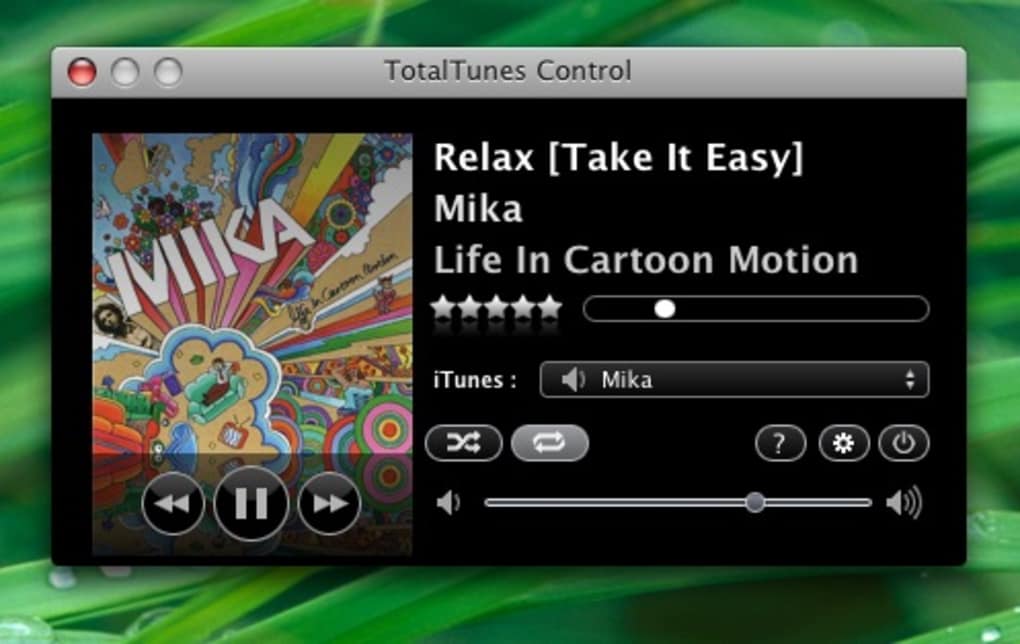
TotalTunes Control is a lightweight Windows utility that sits quietly in your taskbar and gives you instant, keyboard‑driven control over iTunes. While iTunes itself is an excellent media library manager, it falls short when you need fast, on‑the‑fly adjustments while listening to music or watching videos. TotalTunes Control bridges that gap by offering a compact window with play, pause, forward, rewind, volume, and progress sliders, as well as repeat, shuffle, and source‑selection menus. The real power comes from its customizable hotkey system, which lets you assign keyboard shortcuts to the most common iTunes actions. This makes it possible to manage your music without ever leaving the application you’re currently using – a true productivity boost for power users, DJs, and anyone who runs a large music collection. The software launches automatically at Windows startup, remains dormant in the system tray, and can be recalled with a single click or hotkey. Although the default settings are locked, the program still offers far more flexibility than iTunes alone. In short, TotalTunes Control is a free, secure, and easy‑to‑install add‑on that turns iTunes into a truly mobile music workstation.
Key Features and Functionalities
- Taskbar‑Resident Design: Stays hidden in the system tray until you need it, keeping your desktop clutter‑free.
- Custom Hotkeys: Assign your own keyboard shortcuts for play/pause, next track, previous track, volume up/down, and more.
- Compact Control Window: A minimal UI that shows progress, volume sliders, and toggle buttons for repeat and shuffle.
- Source Menu: Instantly switch between your iTunes library, playlists, or smart playlists without opening iTunes.
- Real‑Time Synchronization: Changes made in TotalTunes Control reflect instantly in iTunes and vice versa.
- Secure Updates: Automatic update checks ensure you always have the latest bug fixes and feature enhancements.
- Free for Personal Use: No hidden fees or trial periods – download, install, and start controlling iTunes right away.
Why These Features Matter
For users who juggle multiple applications while listening to iTunes, the ability to control playback without shifting focus is a game‑changer. The hotkey engine eliminates the need to reach for the mouse, speeding up workflow for editors, podcasters, and gamers alike. The taskbar‑resident design means the app never interferes with full‑screen programs, making it ideal for gamers who want background music. Additionally, the source menu consolidates playlist navigation into a single click, saving valuable time when you need to cue up a specific set of tracks. Finally, because TotalTunes Control is free and regularly updated, it offers a low‑risk solution for anyone looking to extend iTunes’ functionality without investing in expensive third‑party DJ software.
Installation, Setup, and Daily Usage
Getting TotalTunes Control up and running is straightforward. Follow these steps for a smooth installation:
- Download the Installer: Click the “Download” button on the official website to retrieve the
.exefile. - Run as Administrator: Right‑click the installer and select “Run as administrator” to allow the program to write necessary registry entries.
- Accept Default Settings: The installer will prompt you to accept the default configuration. While you cannot change every option during installation, you can later adjust hotkeys from within the app.
- Complete Installation: Click “Install” and wait for the progress bar to finish. The installer will automatically add a shortcut to the Start menu and register the app to launch at Windows startup.
- Launch the App: After installation, TotalTunes Control appears as an icon in the system tray. Click the icon or press the default hotkey (
Ctrl+Alt+T) to open the control window.
Configuring Hotkeys
Once the main window is open, click the Settings gear icon. You will see a list of actions (Play/Pause, Next, Previous, Volume Up, Volume Down, etc.) with corresponding text fields. Click a field and press the key combination you want to assign. Press Save to store your preferences. Although the installer locks some advanced options, the hotkey editor is fully functional and remembers your custom shortcuts across reboots.
Everyday Workflow
During normal use, the control window can be minimized back to the tray, leaving iTunes to run in the background. When you need to change a track, adjust the volume, or toggle shuffle, simply invoke the window or use your predefined hotkeys. The progress slider updates in real time, allowing you to scrub to any point in a song without opening iTunes. If you maintain multiple playlists, the source menu lets you switch context with a single click, ensuring the right music is always playing for the task at hand.
Compatibility, System Requirements, and Pros & Cons
TotalTunes Control is built exclusively for the Windows operating system, supporting Windows 7, 8, 8.1, 10, and 11 (both 32‑bit and 64‑bit). It requires iTunes version 12.0 or higher, which is the standard for most modern Windows installations.
Pros
- Lightweight and runs silently in the taskbar.
- Fully customizable hotkeys improve productivity.
- Real‑time synchronization with iTunes prevents mismatched states.
- Free for personal use with no hidden costs.
- Regular, secure updates keep the software reliable.
Cons
- Default settings are locked during installation, limiting deep customization.
- Only available for Windows; macOS and Linux users are left out.
- Hotkey configuration UI could be more intuitive for beginners.
- Relies on iTunes being installed; no standalone playback.
- Occasional minor glitches when switching between multiple iTunes instances.
Frequently Asked Questions
Is TotalTunes Control completely free?
Yes, TotalTunes Control is offered as a free download for personal use. There are no hidden fees, trial periods, or mandatory registrations.
Can I use TotalTunes Control with iTunes on a Mac?
Currently, TotalTunes Control is a Windows‑only application. macOS users will need to look for alternative iTunes remote tools that support macOS.
How do I change the default hotkeys if the installer locks settings?
After installation, open the TotalTunes Control window, click the Settings icon, and you will be able to reassign any hotkey listed. The lock only applies to installation‑time options, not the hotkey editor.
Does TotalTunes Control work with iTunes playlists that contain videos?
Yes, the source menu can switch to any playlist, whether it contains audio tracks or video files. Playback controls function the same way for both media types.
Is the software safe from viruses and malware?
TotalTunes Control is digitally signed and distributed from the developer’s official website. It undergoes regular security scans, and the installer is free of adware or unwanted programs.
Conclusion & Call to Action
TotalTunes Control fills a clear niche for Windows users who need a fast, reliable way to manage iTunes without interrupting their workflow. While it could benefit from deeper customization options and a macOS version, its core features—taskbar residency, robust hotkey support, and real‑time syncing—make it a valuable addition to any music‑centric setup. The free price tag and lightweight footprint further enhance its appeal, especially for power users who already rely on iTunes for large libraries. If you’re looking to gain more control over your iTunes playback while keeping your desktop uncluttered, give TotalTunes Control a try today.
Ready to boost your iTunes workflow? Download TotalTunes Control now and start mastering your music with a single keystroke.
Guides & Tutorials for TotalTunes Control
How to install TotalTunes Control
- Click the Preview / Download button above.
- Once redirected, accept the terms and click Install.
- Wait for the TotalTunes Control download to finish on your device.
How to use TotalTunes Control
This software is primarily used for its core features described above. Open the app after installation to explore its capabilities.
User Reviews for TotalTunes Control 0
No reviews found





.webp)